An electrical problem can prompt a mobile search, but the searcher’s urgency, result choices, and next step vary. Keep the page responsive, make current availability and service coverage clear, and provide an accessible contact path. Use real-user performance, calls, delivery, qualification, booked work, and completed jobs to identify where the journey breaks.
A slow or confusing page may contribute to lost inquiries, but the effect is not visible from page design alone. Monitor real-user performance, calls, form delivery, qualification, booked work, and common exit points. Use that evidence to improve the page and contact path instead of assigning one emergency journey to the entire audience.
An electrician website should explain supported services, establish verifiable trust and provide a clear path to a staffed response. This guide covers the page, proof, mobile and measurement choices to test against real inquiries and booked work.
Test the mobile contact route and explain actual services, coverage and credentials. Use field data and qualified inquiries to evaluate performance rather than unsupported mobile-share or design multipliers.
A mobile clarity test for your website
Open the site on representative phones and check whether a visitor can identify the supported services, operating area, staffed contact options, and expected next step. Record any friction, then compare delivered calls, form submissions, qualification, and booked work after a change.
Some visitors may need urgent help, while others are planning an installation, inspection, or upgrade. Explain the supported service, availability, operating area, verifiable credentials, and appropriate contact route without assigning one emergency journey to the whole audience.
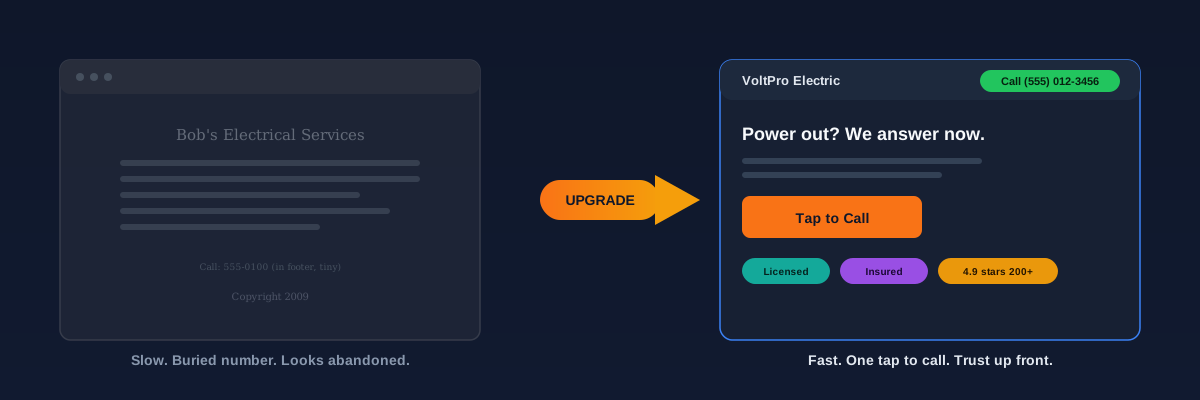
Where older electrician websites can create friction
Older sites may contain stale business information, unusable contact controls, slow media, or generic content. Review the actual page and customer journey rather than treating visual age alone as proof of lost trust or inquiries.
Make contact options easy to use on mobile
Make the current phone or booking path easy to find on representative mobile screens. Use analytics and call records to understand how visitors contact the business, and keep the rest of the page focused on the information they need to choose the next step.
A tap-to-call control and a form serve different visitors and operating conditions. Track each path separately, confirm that calls and forms reach the right team, and compare accepted inquiries rather than assuming one control always converts better.
- A visible business number or contact control where it helps the page's intended visitor.
- A primary action near the service summary when the team can staff that response path.
- A mobile contact control that remains usable without covering important content.
- A footer contact route with accurate hours and operating information.
- Touch targets and contrast checked against the site's accessibility requirements.
Pages to consider for an electrician website
Choose pages from the services the business actually provides, customer questions, service coverage, available evidence, and measurement plan. A page should have a distinct purpose and supportable information; page count alone does not establish ranking or conversion performance.
- Homepage: explain the supported work, operating area, proof, and available contact paths.
- Individual service pages: create a page when a service has distinct scope, customer questions, evidence, and demand.
- Emergency service page: publish one only when the business actually offers and staffs that service; state hours and limitations accurately.
- Service area pages: add a location only when coverage and distinct customer information support a useful page.
- About page: show current, permissioned identity and credential information that customers can verify.
- Reviews and past work: use authentic feedback and authorized project evidence with appropriate context.
- Contact or estimate page: explain the available contact methods, staffed hours, routing information, and what happens next.
Trust information customers can verify before contacting you
Electrical work can require access to a home or business and may involve safety-sensitive systems. Accurate identity, credentials, service details, project evidence, and contact expectations can help a prospective customer evaluate fit; presentation alone cannot establish trust or qualification.
Surface current, verifiable proof near the decisions it supports. Permissioned crew photos, applicable license and insurance details, authentic reviews and a usable contact path can help visitors evaluate fit; test placement and wording rather than assuming one arrangement is best.
Show current license and insurance information where applicable, genuine customer feedback with permission, and authorized project photos. Display only earned certifications and accurate warranties. There is no required review count for a useful website.
- Generic image without business context
- Applicable license information absent or stale
- Vague testimonial without permissioned detail
- Phone or booking path difficult to find
- Template content that does not explain the actual service
- Permissioned photos of the real team and work
- Current license and insurance information where applicable
- Authentic reviews shown with appropriate context
- Accessible call or booking path where staffed
- Service and process details specific to the business
Treat speed as a measurable usability condition
Slow loading and delayed interaction can make a page harder to use. Measure field performance, contact attempts, delivered inquiries, qualification, and completed work before assigning ranking or commercial impact to a speed change.
Slow loading and delayed interaction can create friction, especially on mobile. Use current field data and repeatable lab tests to identify the actual bottleneck, fix it, and compare the same routes afterward. Do not convert a general speed benchmark into a promise about calls.
“Load time is a usability condition rather than a promised phone call. Measure real-user performance alongside contact attempts, delivered inquiries, qualification, and completed work before assigning commercial value to a speed change.”
Design the form around routing and qualification
A form can support visitors who cannot or prefer not to call. Ask for the information needed to route and qualify the request, explain the expected response, test the form on real devices, and compare delivery and accepted-inquiry rates when fields change.
Required fields depend on routing, safety, eligibility, and follow-up needs. Remove fields the team does not use, retain information required to handle the request, and measure completion alongside lead quality rather than optimizing submission count alone.
A staged electrician website checklist
You do not need a full rebuild to start improving the path from visit to inquiry. Work through this list, record the baseline, and compare qualified calls and booked work after each change.
- Make the supported phone route a real tap-to-call link and test its placement on representative mobile screens.
- Place the primary contact option near an accurate service summary when that response path is staffed.
- Prioritize permissioned photos of actual work or the crew, and label any illustrative image accurately.
- Use current permissioned reviews and applicable license information where visitors can evaluate them.
- Test your load speed on a phone and cut the heaviest images and unused plugins.
- Remove form fields the team does not use and retain the information needed to route and qualify the request.
- Build a dedicated service or location page when value, demand, coverage, proof, and customer questions support distinct content.
Together, these changes make the website a clearer customer-information and inquiry surface. Monitor contact delivery, qualified opportunities, and completed jobs so future design decisions follow observed outcomes.
We build fast, trust-aware electrician websites with measurable call and form paths.
Review an electrician website projectNot sure where the current site creates friction? Book a quick call to review the pages, contact paths, delivery, and measurement setup, then prioritize changes that can be tested.
30 minutes, honest feedback, and a short list of testable fixes for your site.
Book a free website teardownSources and further reading
- Google Search: SEO Starter Guide
Crawlable links, descriptive page information and content organization. Practical trade examples are SF Web Tech recommendations.
Source checked .
- Google Search: creating helpful content
People-first writing, useful original information and the absence of a preferred word count. Does not substantiate a client result.
Source checked .
- Google Maps: prohibited and restricted content
Rules against fake engagement, incentives and selectively soliciting positive reviews.
Source checked .