More electrician website traffic will not fix a site that sends every visitor into the same generic contact form. An urgent homeowner with a sparking panel and a property owner planning an EV charger installation have different questions, timelines, and reasons to hesitate. If your site treats them alike, both can leave without calling.
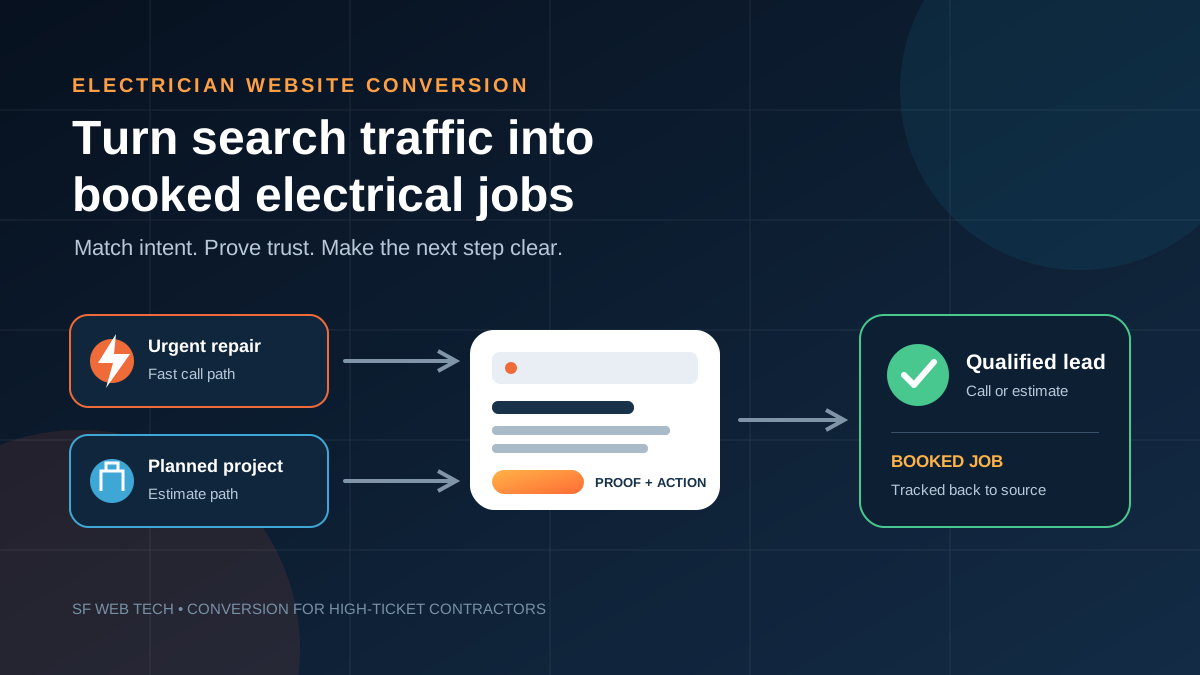
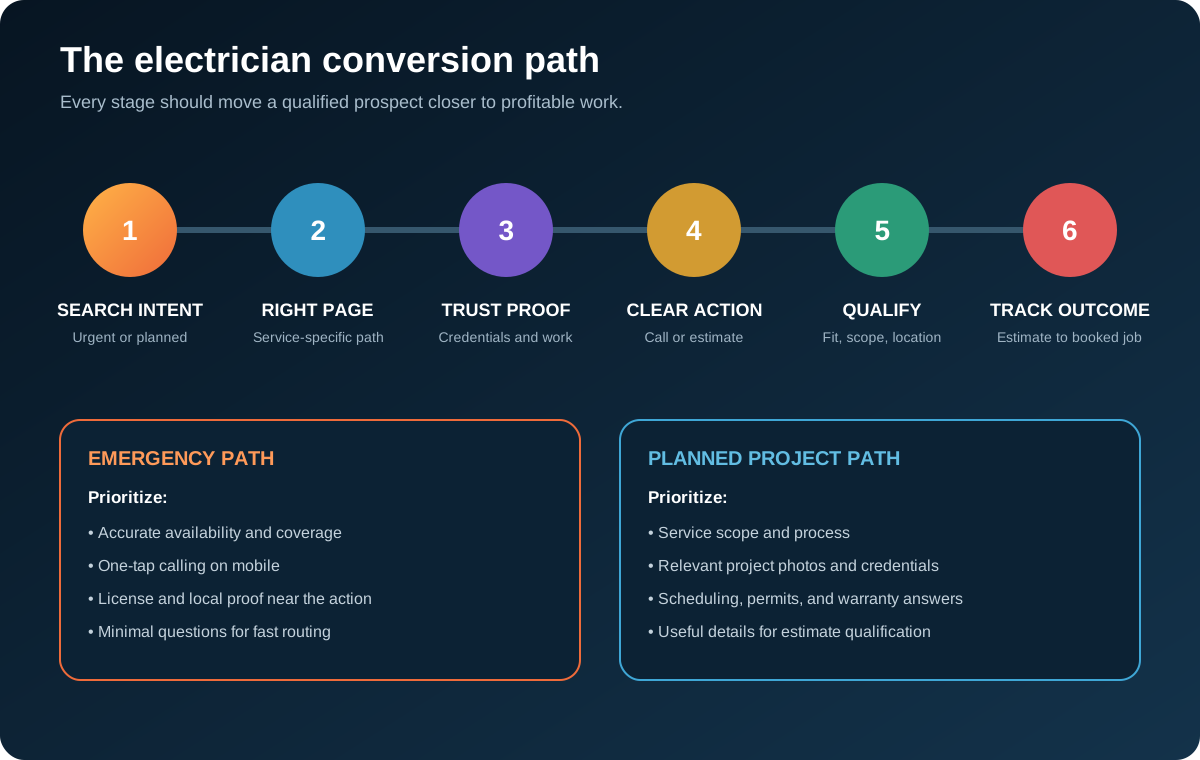
The conversion job is simple to describe: recognize intent, show the right proof, make the next step obvious, and track whether the inquiry became profitable work. The hard part is building that path around how an electrical company actually sells. Calls are not all equal. A booked panel upgrade is more valuable than an unqualified request outside your service area, and your reporting should know the difference.
Separate emergency intent from planned project intent
Electrical search demand splits into two broad paths. Emergency visitors need reassurance that you answer, serve their location, and can handle the problem safely. Planned-project visitors need scope, credentials, process, and evidence that you have completed similar work. One homepage can introduce both, but it should not force both buyers through identical copy.
- Lead with the problem and current availability
- Keep tap-to-call visible throughout the mobile page
- Confirm the real service area and business hours
- Show license, insurance, and local review proof near the action
- Ask only what dispatch needs to respond
- Explain the service, typical scope, and site requirements
- Show relevant project photos and completed-work details
- Address permits, inspections, scheduling, and warranties
- Offer estimate scheduling rather than emergency language
- Capture enough context to qualify the opportunity
Build a dedicated route for each commercially important service, such as electrical panel upgrades, EV charger installation, whole-home rewiring, generator installation, lighting, and emergency troubleshooting. This does more than help search visibility. It keeps a visitor focused on the exact outcome they came to buy.
Build clear paths from high-intent visits to qualified electrical jobs
See our contractor website design serviceMake the first mobile screen answer four questions
Most local prospects will judge the page quickly. The first mobile screen should tell them what electrical work you handle, where you work, why they should trust you, and what to do next. A vague promise about quality does not answer any of those questions. A service-specific headline, concise location line, real credential, and clear call or estimate action does.
- Name the service or problem in the headline instead of leading with a slogan.
- State the real service area without claiming cities your crews do not cover.
- Place one primary action above the fold, with a secondary option for visitors who cannot call.
- Use a real tap-to-call link, not a phone number embedded inside an image.
- Add one compact proof line, such as licensed and insured status, only when accurate.
- Keep navigation choices limited so urgent visitors do not have to decode the site.
The call button should use accurate language. Do not promise 24-hour response, same-day appointments, or emergency dispatch unless the team can consistently deliver it. A clear promise that operations cannot keep creates bad reviews and wasted leads. Conversion copy must match the capacity behind it.
Put electrical trust proof next to the decision
Electrical work carries obvious safety and property risk. Prospects want to know who will arrive, whether the company is legitimate, and whether it has handled the same type of project. Do not hide that proof on an About page. Place relevant evidence beside the call button, estimate form, and service explanation.
Remove friction without removing qualification
A short form is easier to complete, but a form can be too short for the sales team to use. The right fields depend on the path. Emergency repair may need name, phone, ZIP code, problem, and timing. A planned project may also need property type, service requested, desired schedule, and a photo upload. Ask only for information that changes routing or follow-up.
- Label the form for the specific next step, such as Request an Estimate or Ask About a Panel Upgrade.
- Explain what happens after submission and when the prospect should expect a response.
- Use plain field labels that remain visible while the visitor types.
- Make errors specific so the visitor knows exactly what to fix.
- Test the form on a phone and confirm that the success message and notification both work.
- Send the lead to a monitored system, not an inbox nobody checks after hours.
The Department of Justice says businesses open to the public should make web content accessible to people with disabilities. Practical form work includes visible labels, keyboard operation, readable contrast, useful error messages, and alternative text for meaningful images. Accessibility is not a decorative audit item. It helps more prospects complete the action without assistance.
Treat speed and stability as sales requirements
A visitor cannot call from a page that is still struggling to display its main content. Large photo files, autoplay video, stacked chat widgets, and unnecessary scripts can delay the exact elements that matter. They can also make buttons shift while a visitor tries to tap.
Google defines Core Web Vitals around loading, responsiveness, and visual stability. Its current guidance says a good experience targets Largest Contentful Paint within 2.5 seconds, Interaction to Next Paint below 200 milliseconds, and Cumulative Layout Shift below 0.1. These are named technical measures, not a promise that hitting them will produce a specific number of leads. Use field data in Search Console and PageSpeed Insights, then test the actual call and form paths on common phones.
- Compress real project photos and serve appropriately sized images.
- Reserve image dimensions so page elements do not jump during loading.
- Remove plugins, trackers, and widgets that do not support sales or measurement.
- Load the primary headline and action before decorative media.
- Check the page on mobile data, not only fast office Wi-Fi.
- Retest after adding call tracking, chat, scheduling, or review tools.
Connect contractor SEO, paid search, and website conversion around profitable jobs
Build traffic and conversion togetherTrack qualified calls through to booked jobs
Analytics that stop at page views and button clicks cannot tell you whether the website is helping the business. Google Ads supports website call conversion tracking and allows advertisers to count calls that exceed a minimum duration they choose. It can also attribute those calls to specific keywords, ads, ad groups, and campaigns. That is useful, but call duration is still a proxy. Your office needs to record whether the caller was qualified, scheduled, quoted, and won.
Use distinct numbers or dynamic number insertion carefully so attribution works without breaking the consistent business information customers rely on. Record form submissions, click-to-call actions, completed calls, booked estimates, sold jobs, job type, service area, and source. Then review the pipeline by service, not just in one blended total.
- Traffic increased
- Call button clicks increased
- Form submissions increased
- Average session time improved
- No connection to revenue or job type
- Qualified calls by service and source
- Estimates scheduled from calls and forms
- Booked jobs by project type
- Lost leads grouped by reason
- Cost per booked job where ad spend applies
Run a practical electrician conversion audit
Start with the pages receiving meaningful organic or paid traffic. Do not redesign the entire site based on preference. Walk each high-intent path, identify the largest obstacle, make one controlled improvement, and compare qualified outcomes over a useful period. Seasonal shifts and campaign changes can distort short tests, so document what changed.
- Choose one high-value service page and define its intended visitor and primary action.
- Open it on a phone and confirm service, location, proof, and action appear immediately.
- Call the number, submit the form, and verify that both routes reach a monitored destination.
- Check whether the office can identify source, service, location, and lead quality.
- Review recordings or notes for repeated objections and unanswered questions.
- Improve the page around one observed problem rather than copying a competitor.
- Compare qualified calls, scheduled estimates, and booked jobs before scaling traffic.
Conversion is not a one-time button-color project. It is the operating link between marketing and dispatch. The strongest electrician sites make urgent help easy to reach, give planned-project buyers enough confidence to request an estimate, and return real sales outcomes to the marketing team. That is how website traffic becomes work on the schedule instead of another chart in a monthly report.
Review the path from search traffic to qualified electrical jobs before buying more clicks
Book a contractor website conversion reviewSee the broader page structure and trust elements for an electrical contractor website
Read the electrician website design guideSources and further reading
- Google Search: SEO Starter Guide
Crawlable links, descriptive page information and content organization. Practical trade examples are SF Web Tech recommendations.
Source checked .
- Google Search: creating helpful content
People-first writing, useful original information and the absence of a preferred word count. Does not substantiate a client result.
Source checked .
- Google Maps: prohibited and restricted content
Rules against fake engagement, incentives and selectively soliciting positive reviews.
Source checked .