A security-system visitor may evaluate legitimacy, privacy, equipment, monitoring, service terms, coverage, and the consultation process before making contact. Explain current verifiable details near the inquiry path and collect proportionate information. Measure page use and qualified contacts without inventing a specific incident or universal trust question.
Security buyers may look for licensing, monitoring terms, equipment details, privacy practices, and permissioned proof before making contact. A modern layout and visible form do not answer those questions by themselves. Put verifiable legitimacy and offer details near the inquiry path, then measure whether qualified contacts improve.
Why a generic contact form may be insufficient
Many home-service templates use a short introduction followed by a free-quote form. Some security prospects need equipment, monitoring, privacy, installation, credential, or support information before they are ready to share contact details. Review the questions received by sales and support, publish answers the business can verify, and test whether the form asks for an appropriate next step.
Security prospects may want pricing context, equipment compatibility, monitoring terms, installation details, credentials, or a conversation before requesting a quote. Offer a clear quote path alongside other appropriate contact routes. Review field behavior and qualified outcomes to learn whether visitors need a consultation, phone option, comparison aid, or more complete terms.
Show verifiable credentials, the actual monitoring provider, and the terms that apply to the offered system. Publish an alarm-response interval or certification badge after the provider confirms it for that service. Explain the steps from consultation to installation and the included support, then test whether customers can find those answers easily.
Review technical and content conditions that can limit visibility, usability, and qualified inquiries.
Review why your contractor website is not rankingThe Trust Questions a Buyer Answers Before They Call
Security buyers may evaluate licensing, monitoring, equipment ownership, contract terms, installation process and proof before contacting a provider. Put verified answers where they are easy to find, then use inquiry records and user testing to learn which questions affect the next step.
“A useful security page answers material trust, scope, equipment, monitoring, privacy, and support questions with current evidence, then gives the prospect an appropriate next step.”
What Belongs Above the Fold
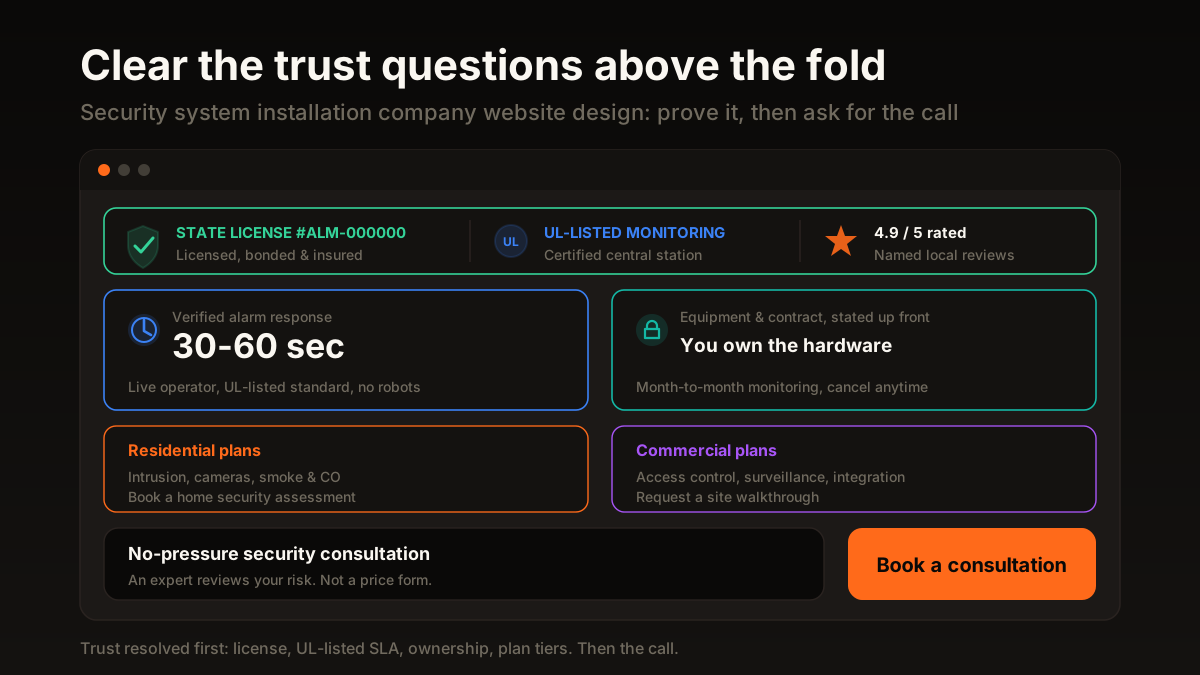
The first screen has limited space and should explain the supported security offer, operating area, verifiable credentials, and appropriate next step. Put relevant proof near the inquiry path, but do not assume a visitor decides within a fixed number of seconds. Test page use and qualified contacts.
- Show applicable licensing, jurisdiction, monitoring relationships, and certifications only when current evidence and brand-use rules support them.
- Publish a monitoring or response-time statement only when the provider can substantiate the definition, period, conditions, and current commitment.
- Explain current equipment ownership, contract length, renewal, cancellation, and service terms in reviewable language.
- Use the consultation, assessment, or quote path the business actually supports and explain what the next step includes.
- Use permissioned reviews and authorized manufacturer marks near relevant decisions when they accurately support the offer.
Trust-first layouts engineered around how your buyers actually decide.
How we design contractor websites that convertResidential vs Commercial Plan Tiers
A homeowner protecting a three-bedroom house and a facilities manager wiring access control across a warehouse are two different buyers with two different budgets, timelines, and fears. When your site funnels both into one generic form, each one assumes you are built for the other. Show clear plan tiers instead, and each buyer sees a path that was obviously designed for them.
- License number and UL-listed monitoring badge above the fold
- Stated response time in seconds on a verified alarm
- Clear equipment ownership and contract terms
- Separate residential and commercial plan tiers
- Consultation CTA framed as a no-pressure security assessment
- Hero photo and a peace-of-mind slogan, no proof
- No monitoring station named, no response time stated
- Contract and ownership terms hidden until the sales call
- One form for homeowners and facility managers alike
- Get a free quote button that filters for price shoppers
Model booked-job cost from installation economics, monitoring value, sales capacity, and verified outcomes.
Set a defensible acquisition targetReplace the Quote Form With a Consultation CTA
Test a consultation path when buyers need help defining cameras, access points, monitoring or integration requirements before a price can be estimated. Keep a quote path for well-defined scopes if the business can price them accurately. Compare accepted inquiries and booked consultations by call to action before choosing one as the default.
Another high-trust, high-ticket trade that lives on the same design principles.
See how solar installers rebuilt for conversionThe Trust Elements Checklist
Before shipping a change, review the site against the checklist below. Each item represents information a prospective buyer may need to evaluate fit, privacy, monitoring, installation and support. Test whether the page answers those questions and whether its contact path produces qualified assessment requests.
- Is your alarm or low-voltage license number visible without scrolling or clicking?
- Is your monitoring station named, and is the UL-listed status stated plainly?
- Do you give a real response time in seconds for a verified alarm?
- Is equipment ownership and contract length explained before the sales call?
- Are residential and commercial buyers given separate, clearly labeled paths?
- Are your reviews attached to real names, and are manufacturer certifications shown?
- Is the primary CTA a consultation, not a price quote, with trust signals beside it?
Named, recent reviews are the trust proof your security site runs on.
Build the review engine that fuels these signalsNone of this is a redesign. It is a re-sequencing. The photos can stay, the brand can stay, the pages can look nearly identical. What changes is the order the page speaks in: prove you are licensed, prove help arrives fast, prove the contract is fair, show the right plan tier, then invite a consultation. Answer the trust questions before you ask for anything, and the form you thought was broken starts to fill in on its own.
We surface your licensing, monitoring SLA, and plan tiers, then route buyers to a consultation that converts.
Book a call and get your security site rebuilt trust-firstSources and further reading
- Google Search: SEO Starter Guide
Crawlable links, descriptive page information and content organization. Practical trade examples are SF Web Tech recommendations.
Source checked .
- Google Search: creating helpful content
People-first writing, useful original information and the absence of a preferred word count. Does not substantiate a client result.
Source checked .
- Google Maps: prohibited and restricted content
Rules against fake engagement, incentives and selectively soliciting positive reviews.
Source checked .